
Camera presets
Presets are available for PTZ and vPTZ cameras. A preset is an assigned camera position. When
you create a preset, you choose a specific area from the camera’s range of motion. When
you select a preset, the camera automatically moves to that area. This allows you to
view multiple areas of interest quickly without the need to manually control the
camera’s PTZ or vPTZ.
Note: Virtual PTZ is not supported on Exacq
cameras.
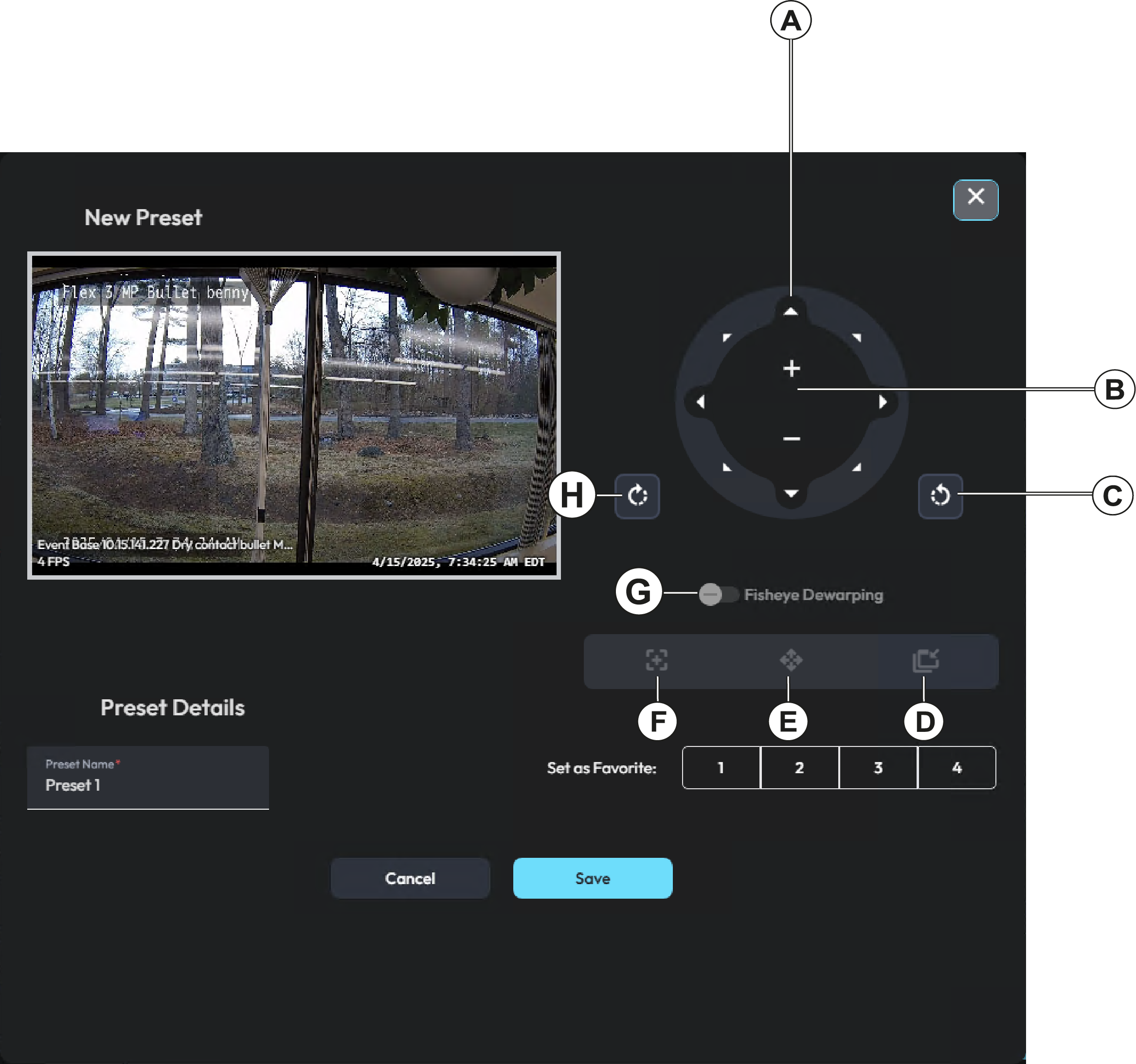
| Callout | Description |
|---|---|
| A | Click the arrows to move the camera in that direction. |
| B | Use the zoom controls to zoom the camera in and out. |
| C | Rotate the image clockwise when you dewarp a fisheye camera. Fisheye cameras only. |
| D | Turn vPTZ on or off. vPTZ cameras only. |
| E | Reposition the camera to the original position. vPTZ cameras only. |
| F | Change the position of the PIP frame from top left to top right, or top right to top left. vPTZ cameras only. |
| G | Rotate the image anticlockwise when you dewarp a fisheye camera. Fisheye cameras only. |
| H | Toggle the fisheye dewarping perspective on or off. Fisheye cameras only. |